-
[Spring-boot] i18n적용 및 동적 데이터 변경공부/spring-boot 2026. 4. 15. 00:46
회사에서 외국 컨퍼런스에 참여를 해야 하는 상황이 생겼습니다. 미리 준비해야 하는 상황이 생겼고, 어떤 식으로 구성해야 할지 고민을 많이 했습니다.
정적인 데이터는 i18n을 활용하면 된다고 하지만 API요청에 따라 변하는 데이터(동적 데이터)는 어떤식으로 처리하면 좋을지 고민을 하게 됐습니다.
이번 글에서는 어떤 식으로 정적, 동적 데이터를 처리했는지 글을 작성하려고 합니다.
혹시라도 부정확한 정보를 전달드릴 수 있습니다. 다만 틀린 거나 부정확한 정보가 있다면 댓글을 남겨주세요.
한국어 / 영어 2개 언어를 지원하는 i18n 구현 과정을 단계별로 정리하였습니다.
1. src/main/resources 에 properties 파일을 생성합니다.
- properties 파일은 한국어와 영어를 accept-language를 기반으로 전달합니다.
- properties 파일은 response message를 변환하기 위한 파일입니다.
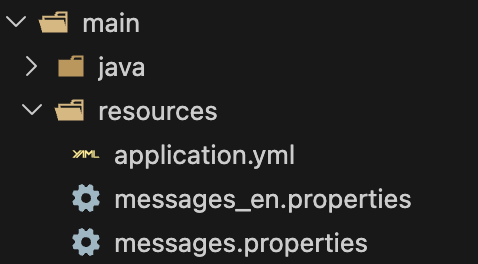
- properties의 예시입니다.
# messages.properties (한국어 - 기본)
# x로 표시된 것들은 직접 오류, response 등 관련 내용들을 작성하시면됩니다.
# Error Code
internal.x=서버 내부 오류가 발생했습니다.
invalid.x=잘못된 입력값입니다.
unauthorized=인증이 필요합니다.
member.x=멤버를 찾을 수 없습니다.

# Auth - Success
auth.x=회원가입이 완료되었습니다.
auth.x=로그인이 완료되었습니다.
auth.x=토큰이 재발급되었습니다.

# Auth - Validation
auth.x=사번은 필수입니다.
auth.x=사번은 100자를 초과할 수 없습니다.
auth.x=비밀번호는 필수입니다.

# messages_en.properties (영어)
# Error Code
internal.x=Internal server error occurred.
invalid.x=Invalid input value.
unauthorized=Unauthorized.
member.x=Member not found.

# Auth - Success
auth.x=Sign up has been completed.
auth.x=Login has been completed.
auth.x=Token has been reissued.

# Auth - Validation
auth.x=Employee number is required.
auth.x=Employee number cannot exceed 100 characters.
auth.x=Password is required.
- 저의 경우 파일 네이밍 규칙을 message_언어코드. properties로 설정하였습니다.
ex. messages_ja.properties (일본어)
2. Application main에 'Accept-Language' 헤더 기반 Locale 코드 추가
# Bean으로 설정한 이유는 싱글톤으로 관리하고, 어플리케이션에서 하나의 인스턴스로 필요해서 입니다.

....
@Bean
public LocaleResolver localeResolver() {
	AcceptHeaderLocaleResolver localeResolver = new AcceptHeaderLocaleResolver();
	localeResolver.setDefaultLocale(Locale.KOREAN);
	return localeResolver;
}

@Bean
public ResourceBundleMessageSource messageSource() {
	ResourceBundleMessageSource messageSource = new ResourceBundleMessageSource();
    messageSource.setUseCodeAsDefaultMessage(true);
    messageSource.setDefaultEncoding("UTF-8");
    messageSource.setBasename("messages");
    return messageSource;
}
...
- AcceptHeaderLocaleResolver는 Accept-Language 헤더에서 전달받은 'ko', 'en'을 Locale 기반으로 변경하도록 구성하였습니다.
- 이후 Locale 기반으로 response, error code 등이 전달됩니다.
3. Error Code Enum 변환
- 저의 경우 Error Code를 Enum으로 관리하고 있는 상황에서 propeties에서 공통으로 전달하도록 수정했어야 했습니다.
- HttpStatus, Error Code, Message Key(properties 파일의 키)
@Getter
@RequiredArgsConstructor
public enum ErrorCode {

    // Common
    INTERNAL_SERVER_ERROR(HttpStatus.INTERNAL_SERVER_ERROR, "C001", "internal.x"),
    INVALID_INPUT_VALUE(HttpStatus.BAD_REQUEST, "C002", "invalid.x"),
    METHOD_NOT_ALLOWED(HttpStatus.METHOD_NOT_ALLOWED, "C003", "method.x"),
    ACCESS_DENIED(HttpStatus.FORBIDDEN, "C004", "access.x"),

    // Auth
    UNAUTHORIZED(HttpStatus.UNAUTHORIZED, "A001", "unauthorized"),
    INVALID_CREDENTIALS(HttpStatus.UNAUTHORIZED, "A002", "invalid.x"),
    TOKEN_EXPIRED(HttpStatus.UNAUTHORIZED, "A003", "token.x"),
    .....

	private final HttpStatus httpStatus;
	private final String code;
	private final String message; // properties 파일의 키
}
- message가 properties 파일에 있는 키로 사용하기 때문에 각 파일마다 동일한 키를 사용해야 합니다.
4. ApiResponse에 i18n 관련 코드 추가
@Getter
@NoArgsConstructor
@AllArgsConstructor
@Builder
public class ApiResponse<T> {

    private boolean success;
    private String message;
    private T result;
    private LocalDateTime timestamp;

    /**
     * i18n 지원 성공 응답
     * - messageKey를 MessageSource에서 Locale에 맞는 메시지로 변환
     */
    public static <T> ApiResponse<T> success(String messageKey, T data,
                                              MessageSource messageSource, Locale locale) {
        String message = messageSource.getMessage(messageKey, null, messageKey, locale);
        return ApiResponse.<T>builder()
                .success(true)
                .message(message)
                .result(data)
                .timestamp(LocalDateTime.now())
                .build();
    }

    /** i18n 미사용 */
    public static <T> ApiResponse<T> success(T data) {
        return ApiResponse.<T>builder()
                .success(true)
                .message("Success")
                .result(data)
                .timestamp(LocalDateTime.now())
                .build();
    }
}
- 저의 경우 messageSource.getMessage에서 properties파일로 전달하여 response를 전달합니다.
1. 첫 번째 인자(messageKey) - 메시지 키
2. 두 번째 인자(null) - 메시지 파라미터
3. 세 번째 인자(messageKey) - 키를 못 찾았을 때 반환할 기본값
4. 네 번째 인자(locale) - 적용한 Locale
5. ErrorResponse에도 코드 추가
@Getter
@NoArgsConstructor
@AllArgsConstructor
@Builder
public class ErrorResponse {

    private String code;
    private String message;
    private int status;
    private LocalDateTime timestamp;
    private List<FieldError> errors;

    /** i18n 지원 에러 응답 (비즈니스 예외) */
    public static ErrorResponse of(ErrorCode errorCode, MessageSource messageSource, Locale locale) {
        String message = messageSource.getMessage(
                errorCode.getMessage(),  // 메시지 키
                null,
                errorCode.getMessage(),  // 키 자체를 메시지로 사용
                locale
        );
        return ErrorResponse.builder()
                .code(errorCode.getCode())
                .message(message)
                .status(errorCode.getHttpStatus().value())
                .timestamp(LocalDateTime.now())
                .errors(new ArrayList<>())
                .build();
    }

    /** i18n 지원 에러 응답 (유효성 검증 에러) */
    public static ErrorResponse of(ErrorCode errorCode, BindingResult bindingResult,
                                    MessageSource messageSource, Locale locale) {
        String message = messageSource.getMessage(
                errorCode.getMessage(), null, errorCode.getMessage(), locale
        );
        return ErrorResponse.builder()
                .code(errorCode.getCode())
                .message(message)
                .status(errorCode.getHttpStatus().value())
                .timestamp(LocalDateTime.now())
                .errors(FieldError.of(bindingResult, messageSource, locale))
                .build();
    }

    @Getter
    @NoArgsConstructor
    @AllArgsConstructor
    public static class FieldError {
        private String field;
        private String value;
        private String reason;

        /**
         * 유효성 검증 필드 에러 i18n 처리
         * - DTO의 @NotBlank(message = "{key}") 형태의 메시지를 해석
         * - {key} 패턴이면 MessageSource에서 번역, 아니면 원본 사용
         */
        public static List<FieldError> of(BindingResult bindingResult,
                                           MessageSource messageSource, Locale locale) {
            List<FieldError> errors = new ArrayList<>();

            for (org.springframework.validation.FieldError error : bindingResult.getFieldErrors()) {
                String message = error.getDefaultMessage();

                // {key} 형태인 경우 MessageSource에서 번역된 메시지 조회
                if (message != null && message.startsWith("{") && message.endsWith("}")) {
                    String key = message.substring(1, message.length() - 1);
                    message = messageSource.getMessage(
                            key, error.getArguments(), error.getDefaultMessage(), locale
                    );
                }

                errors.add(new FieldError(
                        error.getField(),
                        error.getRejectedValue() == null ? "" : error.getRejectedValue().toString(),
                        message
                ));
            }
            return errors;
        }
    }
}
- DTO에서 Error를 전달할 때도 i18n의 키를 이용할 수 있도록 구성하였습니다.
6. GlobalExceptionHandler에 Locale 주입
@Slf4j
@RestControllerAdvice
public class GlobalExceptionHandler {

    private final MessageSource messageSource;

    public GlobalExceptionHandler(MessageSource messageSource) {
        this.messageSource = messageSource;
    }

    /** 비즈니스 예외 처리 - i18n 메시지 사용 */
    @ExceptionHandler(BusinessException.class)
    protected ResponseEntity<ErrorResponse> handleBusinessException(
            BusinessException e,
            Locale locale  // Accept-Language 헤더에서 자동 해석된 Locale
    ) {
        log.warn("BusinessException: {}", e.getMessage(), e);
        ErrorCode errorCode = e.getErrorCode();
        ErrorResponse response = ErrorResponse.of(errorCode, messageSource, locale);
        return ResponseEntity.status(errorCode.getHttpStatus()).body(response);
    }

    /** @Valid 검증 실패 - 필드별 i18n 에러 메시지 */
    @ExceptionHandler(MethodArgumentNotValidException.class)
    protected ResponseEntity<ErrorResponse> handleMethodArgumentNotValidException(
            MethodArgumentNotValidException e,
            Locale locale
    ) {
        log.warn("Validation failed: {}", e.getMessage());
        ErrorResponse response = ErrorResponse.of(
                ErrorCode.INVALID_INPUT_VALUE, e.getBindingResult(), messageSource, locale
        );
        return ResponseEntity.status(ErrorCode.INVALID_INPUT_VALUE.getHttpStatus()).body(response);
    }
}
- 'Locale locale' 파라미터를 선언하기만 해도 Spring에서 자동으로 Locale을 주입해 줍니다.(main에 AcceptHeaderLocaleResolver에서 진행)
7. 각 Controller에 Locale 파리미터 추가
@Slf4j
@RestController
@RequestMapping("/api/test")
public class TestController {

    private final TestService testService;
    private final MessageSource messageSource;

    @PostMapping()
    public ResponseEntity<ApiResponse<TestResponseDto>> test(
            @Valid @RequestBody TestRequestDto request,
            Locale locale  // Accept-Language 헤더에서 자동 주입
    ) {
        TestResponseDto response = testService.test(request);

        return ResponseEntity.ok(
                ApiResponse.success("test.response.success", response, messageSource, locale)
        );
    }
...
}
8. DTO message를 key로 변경
@Getter
@NoArgsConstructor
@AllArgsConstructor
@Builder
public class TestRequestDto {

    @NotBlank(message = "{test.request.dto.invalid.number}")
    @Size(max = 100, message = "{test.request.dto.invalid.number.max}")
    private String number;

    @NotBlank(message = "{test.request.dto.invalid.name}")
    private String name;
}
- {}를 해주는 이유는 ErrorResponse에서 패턴으로 구분하기 위함입니다.
9. Locale 유틸리티 클래스 생성
public final class LocaleUtils {

    private LocaleUtils() {
        throw new UnsupportedOperationException("Utility class");
    }

    /** Locale -> 언어 코드 변환 (ko, en, jp) */
    public static String getLanguageCode(Locale locale) {
        if (locale == null) return "ko";
        String language = locale.getLanguage().toLowerCase();
        if (language.equals("ja")) return "jp"; // 일본어 코드 통일
        return language;
    }

    /** 한국어 Locale인지 확인 */
    public static boolean isKorean(Locale locale) {
        if (locale == null) return true;
        return locale.getLanguage().toLowerCase().equals("ko");
    }

    /** 지원 언어 확인 */
    public static boolean isSupportedLanguage(String languageCode) {
        if (languageCode == null) return false;
        return languageCode.equals("ko") || languageCode.equals("en") || languageCode.equals("jp");
    }
}
- 서비스 레이어에서 Locale 기반으로 분기 처리가 필요한 경우를 위한 유틸리티입니다.
10. DB 칼럼 생성
이 부분이 제일 고민이었습니다. 칼럼을 생성할지 테이블을 분리해서 추가, 수정 등을 진행할지 하지만 현재 서비스에서 테이블을 증가 시켜서 관리포인트를 늘리는것보다 필요한 데이터를 jsonb 타입으로 컬럼을 만들어서 관리하는 것이 맞다고 생각하였습니다.
어떤 방식이 꼭 정답이다고 말하기는 어렵지만 결국에는 고민하고 실행을 한 결과물이 최고의 선택이라고 믿어야 하며, 혹시라도 이후에 수정을 하거나 문제가 발생한다면, 후회보다는 한번 더 배움이 있었다고 생각하면 좋을 거 같습니다. 물론 저도 항상 후회하지만 계속 배우고 성장하려고 노력하고 있기 때문에 모두 같이 힘냈으면 합니다.
Ref.
https://sundaland.tistory.com/693
Adding internationalization into the licensing service
🌍 Spring Boot 마이크로서비스 국제화(i18n) 적용하기🎯 1. 국제화의 필요성국제화(i18n, internationalization)는 다양한 언어와 지역 환경을 지원하는 애플리케이션을 개발하는 과정입니다.🌎 사용자가
sundaland.tistory.com
https://velog.io/@minseojo/%EC%8A%A4%ED%94%84%EB%A7%81%EB%B6%80%ED%8A%B8-%EA%B5%AD%EC%A0%9C%ED%99%94
Spring Boot로 글로벌 서비스를 위한 다국어(국제화) 설정 1 - LocaleResolver
LocaleResovler 인터페이스, AcceptHeaderLocaleResolver 클래스, SessionLocaleResolver 클래스, CookieLocaleResolver 클래스, FixedLocaleResolver 클래스
velog.io